A church service may include many different elements: worship songs, Scripture readings, sermons, announcements, videos, photographs, prayers, and special presentations. When all of these elements need to appear on a projector, television, or large screen, having a simple and reliable presentation system can make a significant difference.
WorshipScreen is a browser-based church presentation platform created for exactly this purpose. It allows churches to prepare and display worship lyrics, Bible verses, announcements, images, videos, and other visual materials from one place. Because the service is designed to work through a web browser, churches can avoid the complexity of traditional presentation software and create a more straightforward workflow for weekly services.
The platform can be used by small churches with a single projector as well as larger congregations with dedicated media teams and multiple screens. Its purpose is not to replace the worship service, but to provide the technical tools needed to support it.
What Is WorshipScreen?
WorshipScreen is church presentation software that helps organize visual content for worship services. Instead of creating a separate presentation file every Sunday, a church can maintain a reusable library of songs, prepare Bible passages, create service playlists, and add multimedia content when necessary.
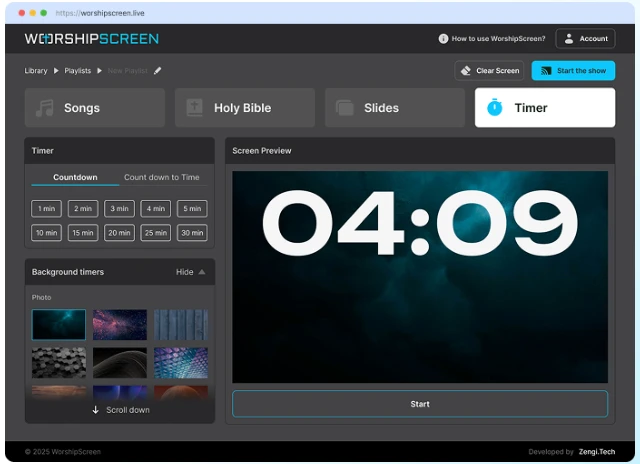
The main workspace includes several important functions. Songs can be saved and reused, Bible passages can be prepared for sermons, slides can be used for announcements and other information, and a timer can be displayed before the service begins.
This makes the platform suitable for many different types of church meetings. It can be used for regular Sunday worship, prayer meetings, Bible studies, youth services, special celebrations, conferences, and other events where content needs to be displayed on a screen.
One of the biggest advantages is that the system is browser-based. The church does not need to depend on a complicated installation process or a specialized presentation computer. The operator can open the platform in a browser, prepare the service, and connect the computer to the church’s display equipment.
A Free Solution for Church Presentation Needs
Churches often need presentation software but may not have the budget, staff, or technical experience required for professional media systems. WorshipScreen provides a free option that covers many of the basic tasks needed during a church service.
If a congregation is searching for free worship software, WorshipScreen can be used to organize songs, Scripture, slides, images, videos, and countdowns in a single environment.
The benefit of having these functions together is easy to understand. Without a unified tool, a volunteer might need one application for song lyrics, another document for Bible passages, a separate presentation for announcements, and another program for videos. Switching between different applications during a live service increases the possibility of mistakes.
A centralized workflow makes preparation easier. The operator can build a playlist before the service and then move through the prepared content as the service progresses.
How WorshipScreen Fits Into a Church Service
The basic idea is simple: prepare everything in advance, create a logical order, connect the presentation screen, and control the content during the service.
For example, a Sunday playlist could begin with a five-minute countdown. After that, the playlist might contain three worship songs, an announcement slide, a short video, a Bible passage, and additional Scripture references for the sermon.
The operator does not need to recreate each item from the beginning. Once a song has been added to the library, it can be used again in another service. Bible passages can also be prepared before the sermon starts.
This creates a repeatable process that can save time every week.
Step One: Create and Prepare Your Account
The first step is to open WorshipScreen and create an account. After entering the workspace, it is useful to configure the general appearance before preparing individual services.
Text alignment, font size, colors, positioning, and backgrounds should be selected with the congregation in mind. A presentation may look attractive on a laptop but still be difficult to read from the back of a large church.
The best approach is to prioritize clarity. Worship lyrics should be easy to read, Bible verses should have sufficient contrast, and announcements should communicate their message quickly.
A consistent visual style also makes the service look more organized. The church can use a recognizable background, logo, or color scheme without making every slide visually complicated.
Step Two: Connect the Church Display
WorshipScreen can be used with a projector, television, LED screen, or another compatible display.
A common setup is a laptop connected to a projector or television using HDMI. When the computer supports an extended display, the operator can keep the control interface on the laptop while the congregation sees only the presentation on the second screen.
This is particularly useful because the operator can prepare the next item without exposing controls or unrelated browser windows to the congregation.
Another possible setup is to open the presentation directly on a compatible smart TV. In this case, another device can be used to control the presentation.
Whatever configuration a church chooses, it is important to test the equipment before the service. Check the resolution, connection, audio if videos are being used, and visibility of text from different seats in the room.
Step Three: Build a Worship Song Library
Worship songs are usually one of the most frequently displayed types of content during a church service. Preparing them efficiently can therefore save a considerable amount of time.
WorshipScreen allows a church to create a reusable song library. When a new song is introduced, its title and lyrics can be added to the system. Once saved, the song can be used again in future services.
This is more efficient than recreating the same slides every week.
A media volunteer can gradually build a complete library of the songs commonly used by the congregation. Over time, preparing a new service becomes mainly a matter of selecting the required songs and arranging them in the correct order.
If lyrics need to be corrected or updated, the saved song can be edited rather than recreated from scratch.
Organize Lyrics Into Readable Slides
Adding lyrics is only part of the preparation process. The way those lyrics are divided between slides is equally important.
A slide should contain enough text for people to follow the song comfortably without becoming overloaded. Long paragraphs or too many lines can make it difficult for members of the congregation to find the correct place.
When WorshipScreen generates slides automatically from lyrics, the operator should review the result. Verse, chorus, bridge, and other sections may need manual adjustments.
It is also worth checking punctuation, spelling, capitalization, and line breaks. Small errors become much more noticeable when words are displayed on a large screen.
The goal is simple: people should be able to look at the screen and immediately understand which words they need to sing.
Step Four: Add Bible Verses
Bible passages are another important part of many church presentations.
Instead of manually typing Scripture into presentation slides, the operator can prepare the relevant passages within WorshipScreen. This can be especially useful when a sermon includes several references.
If the pastor provides the sermon outline in advance, the media volunteer can prepare the expected Bible passages before the congregation arrives.
For example, a sermon might use passages from the Gospels, Psalms, and the New Testament letters. Having each passage ready in the service playlist means the operator can move between them without searching through documents during the sermon.
This reduces distractions and allows the operator to concentrate on following the pastor’s presentation.
Responding to Unexpected Bible References
Church services are not always completely predictable.
A pastor may decide to reference another passage while speaking. A worship leader may introduce an additional verse or repeat a section of a song. A good presentation system therefore needs to allow some flexibility.
WorshipScreen makes it possible to work with prepared content while also making changes when necessary.
The operator can add relevant material to the playlist or select another prepared passage. This combination of preparation and flexibility is useful because it avoids two extremes: trying to improvise everything during the service or making the system so rigid that even a small change becomes difficult.
Slides for Announcements and Church Information
Not every screen in a church service needs to display lyrics or Scripture.
Churches regularly need to communicate information about upcoming events, Bible studies, meetings, volunteer opportunities, community activities, special services, and other announcements.
WorshipScreen can be used to create presentation slides for this type of content.
A simple announcement slide can include a title, short description, date, time, location, and relevant image. The most important information should be immediately visible.
Instead of interrupting the service to make verbal announcements about every detail, some information can be displayed before the service begins or during appropriate transitions.
Add Images and Videos
Visual content can make certain parts of a service more engaging. A church may want to show photographs from a community project, a promotional video for an upcoming event, a sermon illustration, or another piece of media.
WorshipScreen supports images as well as video content, including YouTube videos.
The advantage of including these items in the same playlist is that the operator does not have to move between several different programs. The media can be positioned in the correct place within the service sequence.
However, videos should always be tested beforehand. Internet-based content can behave differently depending on the network connection, so the media team should verify that everything loads correctly before people arrive.
Use a Countdown Before the Service
A countdown timer is a small feature that can have a practical effect on the organization of a service.
Instead of displaying an empty screen while people are taking their seats, the church can show a countdown indicating when the service will begin.
WorshipScreen can display a standard countdown or configure a countdown toward a particular start time. A background image or video can also be used.
The countdown gives both the congregation and the worship team a clear visual indication that the service is approaching. It can also help volunteers coordinate the final preparation of the room.
Create a Playlist for Each Service
Once the content is ready, the next step is to create a playlist.
A playlist should follow the expected order of the service. For example:
- Opening countdown
- Welcome slide
- First worship song
- Second worship song
- Announcement
- Additional worship song
- Bible reading
- Sermon Scripture
- Sermon slides
- Closing information
The exact structure will depend on the church’s worship style, but the principle remains the same: the operator should know what comes next.
Giving each playlist a recognizable name is also useful. A name such as “Sunday Service – October 12” is easier to find later than an automatically generated title.
Over time, previous playlists can also serve as a starting point for future services.
Preparing for a Multilingual Congregation
Some churches serve congregations where members speak more than one language. Displaying bilingual lyrics or Scripture can help different groups participate in the same service.
WorshipScreen can be used to present two languages together when the content is prepared appropriately.
The important consideration is readability. Two languages naturally require more space, so the text should be organized carefully. The font should remain large enough to read from the back of the room, and the two language versions should be visually distinguishable.
This approach can be especially useful for international congregations and churches serving communities with multiple language backgrounds.
How to Operate WorshipScreen During the Service
Preparation is important, but live operation requires a different skill: timing.
The operator should pay attention to what is happening on stage. During a worship song, the next slide should appear when the congregation reaches the relevant lyrics. During a sermon, a Bible passage should appear when the pastor introduces it.
The operator should not simply click through the playlist as quickly as possible. Instead, the presentation should follow the actual pace of the service.
This is why having a prepared playlist is so valuable. When the content is already organized, the operator can focus on timing instead of searching for files.
What to Do When the Service Changes
Even the best preparation cannot predict everything.
A worship leader may repeat a chorus. A pastor may spend more time on one Scripture passage. An announcement may be added at the last minute. A video may be removed from the program.
The media operator should therefore treat the playlist as a guide rather than a rigid script.
WorshipScreen provides a practical environment for making changes while working with the service content. Songs and Bible passages can be selected as needed, while prepared slides and media remain available in the playlist.
The more familiar the operator is with the platform, the easier it becomes to respond without creating visible interruptions.
A Useful Weekly Workflow for Church Media Teams
A church can turn WorshipScreen into a simple weekly routine.
First, collect the information for the upcoming service. This may include the worship song list, sermon title, Bible references, announcements, images, and videos.
Next, prepare or update the required songs and Scripture passages. Create the playlist and arrange the content according to the planned service order.
After that, test the presentation on the actual church display. Check every video, image, lyric slide, Bible passage, and transition.
Finally, arrive early enough to verify the equipment again before the congregation enters.
This process reduces last-minute work and gives the media volunteer a clear checklist to follow.
WorshipScreen for Different Church Traditions
Church presentation requirements vary from congregation to congregation. Some services may focus heavily on contemporary worship songs and multimedia. Others may include hymns, Scripture readings, sermons, announcements, and traditional elements.
The presentation tool does not need to dictate how a church conducts worship. Instead, it provides a flexible system for displaying whatever content the congregation needs.
For churches searching specifically for methodist worship software, the platform can be used to organize worship lyrics, Scripture readings, sermon passages, announcements, and multimedia presentations. The same functions can also be adapted to many other Christian denominations and worship formats.
Why Preparation Matters More Than Complicated Technology
A successful church presentation does not necessarily require an expensive media system.
What matters most is preparation, readability, reliable equipment, and an operator who understands the flow of the service.
A simple tool that the volunteer knows how to use can be more practical than a complicated system filled with features that are rarely needed.
WorshipScreen focuses on the core tasks that churches repeatedly perform: preparing songs, displaying Bible passages, creating slides, adding media, organizing playlists, and managing a countdown.
Because these functions are available together, the media team can spend less time moving between different applications and more time preparing content that supports the service.
Conclusion
WorshipScreen provides a practical way to organize the visual side of a church service. It combines worship songs, Bible verses, slides, images, videos, and timers in a browser-based environment that can be adapted to different churches and service formats.
The workflow is straightforward: create an account, configure the presentation, build a reusable song library, prepare Scripture, add announcements and multimedia, create a playlist, test the display, and control the presentation during the service.
For churches that need an accessible and free way to manage worship presentations, this approach can simplify both weekly preparation and live operation. Instead of treating lyrics, Bible verses, videos, and announcements as separate technical tasks, the church can organize them as parts of one complete service.
When the visual presentation is prepared carefully, the technology becomes a quiet support for worship rather than a distraction. WorshipScreen is designed around that principle, giving churches a single place to prepare and display the content their congregation needs to see.